Evaluating Dachshund Clipart: A Guide to Formats, Quality, and Practical Use Cases
For designers, crafters, and small business owners, selecting the right visual assets is a critical step in any project. When working with specific breeds like the dachshund, the choice often comes down to finding Dachshuns clipart that balances aesthetic appeal with technical functionality. The market is flooded with dog illustrations, but not all files are created equal. Understanding the nuances between file formats, resolution standards, and licensing terms can save hours of frustration during the production phase. This evaluation focuses on what constitutes high-quality dachshund imagery, specifically looking at the trade-offs between raster and vector formats, and how to determine if a specific clipart set meets your project requirements.
Defining the Standard: Resolution and Transparency
The term "clipart" has evolved from simple black-and-white line drawings to complex, high-fidelity digital illustrations. When searching for Dachshund clip art, the first technical specification to evaluate is resolution. Professional-grade assets should typically offer a minimum of 300 DPI (dots per inch). This standard is non-negotiable for anyone intending to print the images on physical products such as t-shirts, mugs, or greeting cards. Files rendered at 72 DPI, common for web use, will appear pixelated and blurry when scaled up for print.
Equally important is the background format. High-quality dog clipart must be provided with a transparent background, usually in PNG format. Opaque backgrounds force the user to spend valuable time manually removing pixels in editing software, a process that often leaves jagged edges or halos around the subject. A true transparent PNG allows the illustration to sit seamlessly on any colored paper, fabric, or digital backdrop. For instance, a set containing 12 individual files, each sized at 12 inches by 12 inches at their longest point, provides ample canvas space for manipulation without losing clarity.
The Vector vs. Raster Debate: SVG and PNG Compared
One of the most significant decisions when acquiring puppy clipart or adult dog illustrations is choosing between vector (SVG) and raster (PNG) formats. Many premium bundles now include both to cater to different workflows, but understanding the distinct advantages of each is essential for effective resource allocation.
PNG (Portable Network Graphics) files are raster images, meaning they are composed of a fixed grid of pixels. The primary strength of a high-resolution PNG lies in its immediate usability. These files can be dragged and dropped into programs like Microsoft Word, Canva, or Procreate without needing conversion. They preserve complex details such as fur texture, shading, and color gradients exceptionally well. However, their limitation is scalability. While a 300 DPI file can be enlarged slightly, pushing it beyond its original dimensions will eventually result in a loss of sharpness. If your project requires a massive billboard or a large-scale wall decal, a standard PNG might hit a ceiling.
In contrast, SVG (Scalable Vector Graphics) files represent images using mathematical paths rather than pixels. This makes vector clipart infinitely resizable. You can scale an SVG from the size of a postage stamp to the side of a building without any degradation in quality. This format is indispensable for users operating cutting machines like Cricut or Silhouette, as these devices read vector paths to determine where to cut vinyl or heat transfer material. The trade-off is that SVGs sometimes simplify complex textures; fine fur details might be smoothed out to maintain clean path lines. Therefore, a comprehensive collection offering both 6 PNG and 6 SVG files provides the versatility needed for diverse applications, ensuring you have the right tool for both print-and-cut projects and digital design.
Assessing Style and Artistic Consistency
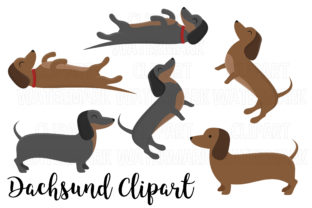
Beyond technical specifications, the artistic style of cute dog clipart plays a pivotal role in brand cohesion. Dachshunds, with their distinctive elongated bodies and short legs, are depicted in various styles ranging from hyper-realistic watercolors to minimalist line art. When evaluating a set, consider the consistency of the collection. A bundle where every illustration shares the same line weight, color palette, and shading technique offers more value than a disparate assortment of unrelated images. Consistent styling allows for the creation of cohesive marketing materials, scrapbook pages, or pattern designs.
Furthermore, the pose and expression of the dachshund matter. Some projects require active, playful poses suitable for children's parties, while others may need dignified, seated portraits for formal invitations. Reviewing the variety within a 12-file set helps determine if the collection covers the necessary emotional range. Does the set include side profiles, front-facing views, and action shots? A lack of variety might necessitate purchasing additional packs, increasing the overall cost and complicating the design workflow.
Practical Applications and Workflow Integration
The utility of Dachshund clipart extends across numerous industries and hobbies. For print-on-demand entrepreneurs, the combination of high-resolution PNGs and scalable SVGs is ideal. The PNGs serve well for direct-to-garment printing where color depth is crucial, while the SVGs are perfect for creating vinyl decals for laptops or water bottles. Crafters utilizing sublimation techniques rely heavily on the 300 DPI standard to ensure that the transfer onto ceramics or metals remains crisp.
Digital planners and website developers also benefit from these assets. Transparent PNGs can be used as icons, dividers, or decorative elements in blogs and social media graphics. Because the files are pre-clipped, they integrate smoothly into web layouts without requiring heavy image editing. However, users must remain aware of file size. While high resolution is good for print, web-optimized versions might be needed to ensure fast loading times for websites, a factor to consider if the source files are particularly large.
Limitations and Decision Factors
While a robust clipart set offers significant advantages, it is not a universal solution for every scenario. Users attempting to create animated graphics may find static PNGs and SVGs limiting, as these formats do not support motion without additional software manipulation. Additionally, those seeking highly specific, custom character designs might find pre-made clipart too generic. In such cases, commissioning a custom illustrator might be a better investment despite the higher cost and longer turnaround time.
Another consideration is the method of delivery. Receiving files in a compressed 'zip file' is standard practice, but it requires the user to have software capable of extracting archives. While this is common knowledge for most digital creators, beginners may find this step confusing. Furthermore, organizing 12 individual files into a logical folder structure upon download is a necessary administrative task to maintain an efficient workflow.
Making the Right Choice for Your Project
Ultimately, the decision to utilize a specific Dachshuns clipart collection depends on the intersection of your project's medium, scale, and aesthetic goals. If your primary output is digital or small-format print, a high-quality PNG set may suffice. However, if you anticipate scaling designs for large formats or using cutting machines, the inclusion of SVG files becomes a deciding factor. The presence of both formats in a single package represents a strategic advantage, eliminating the need to source files from multiple vendors.
When comparing options, prioritize collections that explicitly state their resolution and transparency status. Look for descriptions that confirm the files are fully resizable and free from background noise. By focusing on these technical fundamentals and matching them against your specific use case—whether it's creating a nursery mural, designing a logo, or crafting party favors—you can ensure that the visual assets you choose enhance rather than hinder your creative process. The right clipart acts as a foundation, allowing you to build professional-looking results with efficiency and confidence.