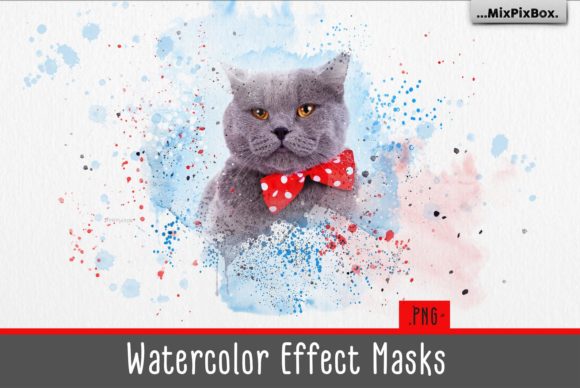
Watercolor Effect Masks: Creative Digital Assets
There is a distinct charm to watercolor art that digital tools often struggle to replicate. The way pigment bleeds into paper, the organic edges of a wash, and the subtle texture of cellulose fibers create a sense of depth and humanity that flat vectors simply cannot match. For designers, marketers, and creators looking to inject warmth and authenticity into their projects, Watercolor Effect Masks offer a powerful solution. These assets are not just decorative overlays; they are functional tools designed to streamline your workflow while maintaining the handcrafted aesthetic of traditional media.
At the core of this collection lies a set of 15 high-resolution PNG elements specifically engineered as masks. Unlike standard images, these files utilize transparency to allow you to reveal or hide parts of your underlying layers with soft, painterly edges. When paired with seven specialized Photoshop splatter brushes and a genuine 300 DPI watercolor paper texture in JPG format, you gain a complete ecosystem for creating sophisticated digital art. This combination allows users across various industries—from freelance graphic designers to small business owners—to produce work that feels tactile and original without needing years of painting experience.
The Mechanics of Digital Watercolor
Understanding how to leverage these masks requires a shift in thinking from "drawing" to "composing." A watercolor mask acts as a stencil with organic, irregular boundaries. Instead of manually painting every stroke, you place your photograph, typography, or solid color block beneath the mask layer. The transparent areas of the PNG allow the content below to show through only where the "paint" would naturally exist. This technique ensures consistency in style while giving you total control over the subject matter.
The inclusion of a high-quality watercolor paper texture is critical for selling the illusion. Digital screens are inherently smooth and backlit, which can make even the best brush strokes look artificial. By applying a 300 DPI paper scan as a top layer set to a blending mode like "Multiply" or "Overlay," you reintroduce the physical imperfections of real stationery. This step grounds the design, making it feel less like a computer generation and more like a piece of printed art. It is a simple adjustment that significantly elevates the perceived value of marketing materials, blog headers, and product packaging.
Practical Applications for Professionals
The versatility of watercolor effects extends far beyond fine art prints. For marketers and social media managers, these assets provide a way to stand out in feeds dominated by polished, corporate photography. A watercolor splash behind a promotional quote or a product shot adds a layer of approachability and creativity. It signals to the audience that the brand values uniqueness and human touch. For instance, a lifestyle blogger could use the splatter brushes to frame a travel photo, instantly giving the image a journal-like quality that resonates with readers seeking authentic experiences.
Educators and publishers can also benefit immensely from this approach. Textbooks, worksheets, and presentation slides often suffer from visual fatigue due to rigid layouts and sterile clip art. Integrating watercolor masks can soften the visual tone, making educational content feel more inviting and less intimidating. Imagine a history lesson where maps are revealed through torn-edge watercolor shapes, or a language learning app that uses soft washes to highlight vocabulary words. The psychological effect of these textures promotes calmness and focus, aiding in information retention.
For entrepreneurs and small business owners, branding is everything. Using a consistent set of watercolor elements can help establish a recognizable visual identity without the cost of custom illustration commissions. By sticking to a specific palette and using the same mask styles across business cards, websites, and packaging, you create a cohesive narrative. The splatter brushes included in the pack allow for quick customization, letting you add unique accents to templates so that no two pieces look exactly identical, preserving a sense of bespoke craftsmanship.
Technical Workflow and Compatibility
One of the greatest strengths of this asset pack is its adaptability across different software environments. While optimized for Adobe Photoshop and Photoshop Elements, the PNG format ensures compatibility with almost any layer-based editor, including Paint Shop Pro, GIMP, and Affinity Photo. The workflow remains consistent: import your base image, apply the mask, and adjust the blending modes. Because the masks are pre-rendered at high resolution, they retain crisp edges even when scaled for large-format printing.
It is important to address the needs of Lightroom users. Traditionally, Lightroom is a non-destructive photo editor that does not support layers in the same way Photoshop does. However, this does not mean you are excluded from using these effects. To utilize watercolor masks in Lightroom, you will need a plugin that enables layer functionality, such as Luminar or specific overlay plugins designed for the platform. Alternatively, a common professional workflow involves editing the photo in Lightroom for color correction and exposure, exporting it to Photoshop to apply the watercolor masks and textures, and then saving the final composite. This hybrid approach leverages the speed of Lightroom with the creative depth of layer-based editing.
Maintaining Clarity and Originality
While watercolor effects are beautiful, they can easily become overwhelming if misused. The key to effective design is restraint. When applying splatter brushes or masks, ensure that the text remains legible and the focal point of the image is not obscured. Use the masks to frame content rather than compete with it. If you are working on a project that requires serious tones, such as a financial report or a legal document, use the textures sparingly—perhaps just a subtle paper grain background—rather than bold, colorful splashes.
To keep your results original, avoid using the masks exactly as they come out of the box. Experiment with opacity levels, invert the masks to create negative space, or combine multiple masks to form new shapes. Change the hue and saturation of the underlying layers to match your specific brand colors. The goal is to use these tools as a foundation upon which you build your own creative interpretation. By tweaking the variables, you ensure that your final output feels intentional and tailored to your specific audience rather than generic.
- Layer Management: Always name your layers clearly (e.g., "Base Photo," "Watercolor Mask," "Paper Texture") to maintain an organized file structure, especially when handing off projects to clients or team members.
- Resolution Awareness: Since the included texture is 300 DPI, ensure your document settings match this resolution if you intend to print. Working at lower resolutions may result in pixelated edges when the texture is applied.
- Blending Modes: Don't limit yourself to "Normal." Try "Screen" for lighter washes, "Multiply" for darker pigments, and "Soft Light" for subtle integration with photos.
Ultimately, Watercolor Effect Masks bridge the gap between the unpredictability of traditional art and the precision of digital design. They empower creators to produce work that feels alive, textured, and emotionally resonant. Whether you are designing a wedding invitation, a tech startup's landing page, or an educational infographic, these tools provide the flexibility to adapt your vision to any context. By mastering the balance between the organic nature of watercolor and the structured environment of digital layers, you can create visuals that not only capture attention but also leave a lasting impression of quality and care.