Integrating Pet Portrait Oil Background V.1 into Professional Digital Art Workflows
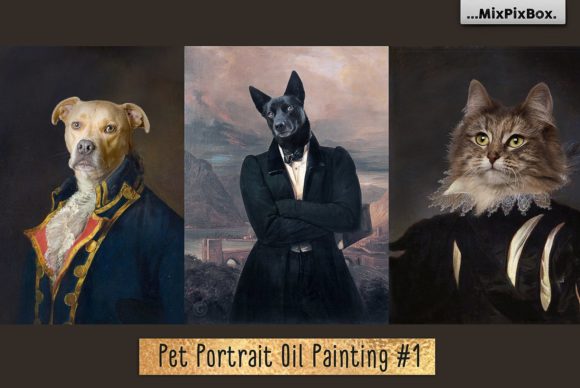
In the rapidly evolving landscape of digital art and graphic design, efficiency often dictates the difference between a profitable project and a stalled one. For professionals ranging from freelance illustrators to small business owners offering custom pet portraits, the pressure to deliver high-quality results quickly is constant. This is where specialized assets like Pet Portrait Oil Background V.1 become critical components of a streamlined creative process. Rather than serving as a mere shortcut, this asset pack represents a foundational layer that allows creators to focus their energy on the nuances of subject rendering while maintaining a consistent, classical aesthetic.
Understanding how to effectively integrate these resources requires a shift in perspective from simple consumption to strategic implementation. The pack includes three high-resolution JPG backgrounds and two PSD Photoshop brushes specifically designed for masking and drawing fur. With resolutions reaching up to 4400x5500 pixels at 300 DPI, these files are engineered for print-ready output. However, possessing the files is only the first step; the real value lies in how they fit into your broader workflow, from initial client consultation to final file delivery.
Strategic Placement in the Creative Pipeline
When planning a pet portrait project, the decision to use a pre-made oil background should occur during the initial scoping phase. Many creators make the mistake of leaving background decisions until the end of the painting process, which often leads to compositional errors or lighting mismatches. By selecting Pet Portrait Oil Background V.1 at the outset, you establish the tonal range and atmospheric depth of the piece before a single brushstroke is applied to the subject.
This early integration supports a more logical workflow. Since the backgrounds are derived from a 90-year-old painting, they possess a specific texture and imperfection profile that mimics traditional canvas. Knowing this early allows you to adjust your digital painting technique to complement these textures rather than fight against them. For instance, if you are working on a commission for a client who desires a vintage or museum-quality feel, introducing this background immediately helps set expectations and guides your color palette choices for the pet itself.
Furthermore, using these templates facilitates better time management. In a professional setting, time spent hand-painting complex oil textures is time taken away from refining the likeness of the animal, which is usually the primary value driver for the client. By outsourcing the background texture to a high-quality asset, you reclaim hours of production time. This efficiency is crucial for entrepreneurs and freelancers who need to maximize their billable hours or increase their throughput without sacrificing quality.
Technical Execution and Layer Management
Successful implementation of Pet Portrait Oil Background V.1 relies heavily on a solid understanding of Adobe Photoshop, specifically regarding layer management and blending modes. The package requires basic knowledge of the software, but leveraging it effectively demands a disciplined approach to file organization. Because the backgrounds are high-resolution images of an actual aged painting, they come with inherent imperfections—cracks, varnish discoloration, and canvas weave—that contribute to their authenticity.
When importing the 2500x2600px, 2700x3300px, or 4400x5500px JPGs into your workspace, treat them as your base layer. Lock this layer immediately to prevent accidental edits. The true power of this workflow emerges when you utilize the included PSD Photoshop brushes. These brushes are not merely for painting; they are essential tools for masking. Creating a realistic composite involves more than just erasing the background behind the pet; it requires integrating the subject into the environment.
Use the fur-specific brushes to soften the edges of your pet selection. A hard cutout looks artificial against an oil texture. By gently brushing along the contours of the animal with the provided masks, you allow hints of the background texture to peek through the fur, creating a sense of depth and unity between the subject and the setting. This technique mimics the way traditional oil painters would glaze layers, allowing the underpainting to influence the final look of the hair strands.
It is also vital to respect the resolution limits. While 300 DPI is standard for print, scaling a smaller background up to fit a larger canvas can degrade the quality of the oil texture, making the imperfections look pixelated rather than artistic. Always choose the background size that most closely matches your intended output dimensions. If you need to crop, do so strategically to highlight the most interesting textural elements of the 90-year-old source material.
Quality Control and Client Expectations
A unique aspect of Pet Portrait Oil Background V.1 is its origin. As an image of a 90-year-old painting, it carries historical artifacts that modern digital generators often smooth over. For the discerning creator, these imperfections are features, not bugs. However, they must be managed carefully to meet client expectations. Some clients may mistake the cracks and age spots of the original painting for errors in your digital work.
To mitigate this, transparency is key during the sales or agreement process. Clearly communicate that the background is a reproduction of a vintage oil painting, complete with authentic aging characteristics. This positions the "flaws" as part of the artistic style, enhancing the perceived value of the portrait as a timeless piece rather than a sterile digital image. This alignment of expectations is a crucial part of the service delivery workflow for educators, bloggers, and business owners who rely on client satisfaction for repeat business.
Quality control also involves checking the interaction between your digital painting and the background texture. Ensure that the lighting direction on the pet matches the implied light source in the background. Even though the background is a static image, the shadows and highlights within the oil texture suggest a specific environment. If your pet is lit from the left but the background suggests light from the right, the composite will feel disjointed. Adjust your subject's lighting layers accordingly to maintain visual coherence.
Scalability and Long-Term Workflow Integration
For marketers and publishers managing content calendars or product lines, consistency is paramount. Pet Portrait Oil Background V.1 offers a way to standardize the look of a series of images. Whether you are creating a line of greeting cards, a social media campaign for a pet brand, or a portfolio of commissioned works, using the same set of backgrounds ensures a cohesive visual identity. This consistency builds brand recognition and trust among your audience.
The versatility of the three included backgrounds allows for variation within that consistency. You can rotate through the different textures for different projects or even combine elements of them using layer masks to create hybrid backgrounds. This flexibility prevents the work from becoming repetitive while maintaining the signature "oil painting" aesthetic that defines your brand or style.
Moreover, the non-destructive nature of working with layers in Photoshop means these assets are future-proof. As your skills evolve or as client demands change, you can revisit old projects and adjust the integration of the background without starting from scratch. Perhaps a year later, you decide to tweak the opacity of the background or apply a new color grade to match a changing trend. Because the background exists on its own layer, these adjustments are seamless.
Maximizing Value Through Preparation
To get the most out of this tool, preparation is essential. Before beginning a project, organize your digital workspace. Create a template file where the Pet Portrait Oil Background V.1 is already imported and layered correctly with adjustment layers for color correction. This "master template" approach reduces setup time for every new commission. When a new order comes in, you simply duplicate the template, import the pet photo, and begin the masking process.
This method also aids in learning and skill development. For hobbyists and students, analyzing how the fur brushes interact with the specific grain of these backgrounds provides valuable insights into digital texturing. It serves as a practical case study in how to blend 2D photography with simulated traditional media. By deconstructing the workflow—observing how the mask softens edges and how the background texture shows through—you develop a deeper understanding of digital compositing principles.
Ultimately, the goal is to make the technology invisible. The best use of Pet Portrait Oil Background V.1 is when the viewer cannot tell where the photograph ends and the painting begins. Achieving this level of seamlessness requires attention to detail, a respect for the source material's history, and a disciplined workflow that prioritizes preparation and technical precision. By treating these assets as integral parts of a professional pipeline rather than simple add-ons, creators can elevate their output, satisfy their clients, and optimize their production time.