Unlocking the Potential of Kawaii Sports Clipart for Your Creative Projects
There is a distinct charm in Kawaii Sports Clipart that instantly softens the competitive edge of athletic imagery, making it perfect for everything from kindergarten gym class newsletters to boutique sports apparel branding. The appeal lies in the blend of high-energy action and adorable, approachable aesthetics. However, diving into the world of digital assets without a clear understanding of file formats and resolution requirements can lead to frustrating results. Many creators rush to download the first cute image they see, only to find it pixelates when printed or refuses to open in their design software. By understanding the nuances between file types like SVG and PNG, and knowing exactly what specifications matter for professional output, you can ensure your projects look polished rather than amateurish.
The Critical Difference Between Raster and Vector Formats
One of the most common pitfalls when selecting sports clipart is overlooking the fundamental difference between raster and vector files. You might see a collection advertising both PNG and SVG formats but assume they are interchangeable. They are not. A PNG is a raster image, meaning it is made of pixels. While high-resolution PNGs, such as those at 300 DPI, are excellent for printing up to a specific size, they have a hard limit. If you try to stretch a small PNG to fit a large banner, the image will become blocky and unusable.
Conversely, an SVG (Scalable Vector Graphic) is math-based. It uses lines and curves rather than pixels, allowing it to be resized infinitely without any loss of quality. This is crucial if you plan to use baseball clipart or soccer icons on items ranging from small stickers to large vinyl decals for a car window. A frequent mistake is buying a pack that only offers PNGs when your project requires scalability. Always verify that your download includes SVG files if there is any chance you will need to resize the artwork later. Having access to both formats in a single zip file provides the flexibility needed for diverse applications, ensuring you are never stuck with an image that is too small or too blurry.
Resolution Matters More Than You Think
Another area where beginners often stumble is assuming that "digital" means "print-ready." Just because an image looks crisp on your smartphone screen does not mean it will print clearly on paper. For physical products like t-shirts, mugs, or invitations, you strictly need files that are 300 DPI (dots per inch). Files saved at 72 DPI, which is standard for web use, will appear jagged and fuzzy when sent to a printer.
When evaluating a set of kawaii sports clipart, check the dimensions carefully. High-quality sets typically provide files that are at least 12 inches by 12 inches at 300 DPI. This ensures that even if you use the full image, it retains sharpness. If you purchase a lower resolution file, you may find yourself unable to use it for anything other than tiny web icons, effectively wasting your money. Always prioritize collections that explicitly state their resolution and physical dimensions before purchasing. This simple check saves you from the headache of trying to upscale a low-quality image, which is technically impossible without losing detail.
Transparency and Background Issues
Nothing ruins a professional design faster than a white box surrounding your basketball or golf clipart when you intended it to float transparently over a colored background. This happens when users accidentally download JPG files instead of PNGs. JPGs do not support transparency; they always fill the empty space with white.
To avoid this, ensure you are working with transparent PNG files. These allow the background of your document to show through the empty spaces of the illustration. This is particularly important for football themed party invites or layered digital scrapbooking pages. If you find yourself manually erasing backgrounds in photo editing software, you are adding unnecessary work to your workflow. A proper clipart pack should come pre-masked with transparency, ready to drag and drop into your design canvas. Taking a moment to inspect the preview images for white halos or background squares can prevent hours of corrective editing later.
Matching the Style to Your Audience
While the "kawaii" style is universally cute, it is essential to consider whether it fits your specific brand or project tone. Kawaii art features exaggerated proportions, large eyes, and soft lines. This is fantastic for youth sports leagues, educational materials, and lifestyle blogs targeting a younger demographic. However, using overly cartoonish baseball or soccer graphics for a serious corporate sports analytics report might undermine your credibility.
The mistake here isn't the art style itself, but the misapplication of it. Before downloading, visualize where the image will live. If you are creating merchandise for a serious adult league, you might want to look for sport clipart that balances cuteness with a slightly more structured look, or reserve the kawaii elements for side graphics rather than the main logo. Understanding your audience ensures that the charm of the clipart enhances your message rather than distracting from it.
Organization and File Management
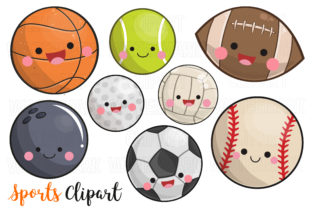
Finally, a often overlooked aspect of using digital assets is organization. When you download a zip file containing 16 individual files, including various sports like golf, basketball, and football, it is tempting to dump them all into one folder and forget about it. This leads to wasted time later when you cannot find the specific SVG version of the baseball clipart you need five minutes before a deadline.
Adopt a better approach immediately upon download. Create a dedicated folder for your sports assets. Inside, separate your PNGs and SVGs into subfolders. Rename the files descriptively if the default names are generic (e.g., change "image01.svg" to "kawaii-baseball-bat.svg"). This small investment in time pays off significantly in efficiency. It allows you to quickly locate the right format and sport, streamlining your creative process and letting you focus on design rather than file hunting.
Key Takeaways for Smart Selection
- Verify Formats: Ensure your download includes both PNG for immediate use and SVG for scalability.
- Check Resolution: Confirm files are 300 DPI for print projects to avoid pixelation.
- Inspect Transparency: Make sure PNGs have transparent backgrounds to avoid unwanted white boxes.
- Consider Context: Match the kawaii style to the appropriate audience and project tone.
- Organize Early: Sort your files by type and name immediately after downloading the zip archive.
By paying attention to these details, you transform a simple download into a powerful resource for your creative toolkit. Whether you are a small business owner launching a new line of sports-themed stationery or a teacher creating engaging classroom rewards, the right kawaii sports clipart can elevate your work. Avoid the common traps of low resolution and wrong file types, and you will enjoy seamless, professional results every time.