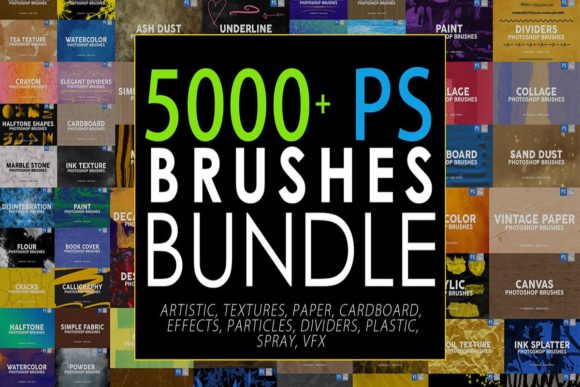
Unlock Your Creative Potential with the 5000 Photoshop Stamp Brushes Bundle
We have all been there. You are staring at a blank canvas in Photoshop, or perhaps a flat photo that just isn't popping, and you know it needs texture, depth, or a specific artistic flair. But creating those effects from scratch can take hours of layering, masking, and tweaking settings. This is exactly where the 5000 Photoshop Stamp Brushes Bundle changes the workflow for creators, marketers, and hobbyists alike. It is not just a collection of digital tools; it is a massive library of over 5,000 pre-made assets designed to turn complex visual tasks into simple clicks.
What makes this bundle stand out in a crowded market of digital resources is its sheer versatility and the practical value it offers for a fraction of the usual cost. For only $12, you gain access to a comprehensive suite of brushes that covers almost every artistic and technical need imaginable. Whether you are a freelance graphic designer rushing to meet a client deadline, a social media manager trying to make the next Instagram post stand out, or an educator creating engaging visual materials, this pack serves as a genuine time-saver. The files come in the standard .abr format, meaning they integrate seamlessly into Adobe Photoshop, and for those who prefer working on tablets, these brushes are also compatible with the Procreate app, bridging the gap between desktop and mobile creativity.
Real-World Applications for Diverse Creators
The true power of this collection lies in how it adapts to different professional and personal scenarios. Let's look at how specific groups can leverage these tools in their daily work.
Social Media Managers and Content Creators
In the fast-paced world of social media, visual consistency and eye-catching graphics are currency. Imagine you need to create a promotional story for a new product launch. Instead of searching for stock overlays or spending twenty minutes painting a light leak effect, you can simply select one of the 1505 VFX Brushes included in the pack. With high-resolution options up to 2500 pixels, you can instantly add snow, fire, lightning, flares, or sun rays to your images. Need to highlight a sale price? The 285 Underline Photoshop brushes offer stylish, hand-drawn accents that look far more organic than standard digital lines. These small touches elevate a basic photo into a polished piece of content that stops the scroll.
Digital Artists and Illustrators
For painters and illustrators, finding the right texture is often the difference between a flat image and a masterpiece. This bundle provides an extensive range of traditional media simulations. You have access to 686 Artistic Photoshop Brushes that mimic canvas, chalk, crayon, acrylic, ink, watercolor, charcoal, and even marble. If you are aiming for a gritty, urban aesthetic, the 487 Ink Strokes and Shapes allow you to add dynamic splatters and bold lines instantly. Furthermore, the inclusion of 90 Gouache Texture Brushes and 90 Palette Knife Texture Brushes lets you replicate thick, impasto paint strokes without needing physical supplies. This is particularly useful for concept artists who need to iterate quickly on mood boards or final illustrations.
Photographers and Retouchers
Photo manipulation requires subtlety and realism. When compositing images, adding atmospheric elements like dust, fog, or rain can tie disparate photos together. The 975 Various Effects Photoshop Brushes cover particles, dust, splashes, flour, foil, cracks, glass, sand, and destruction effects. Suppose you are editing a portrait and want to give it a vintage, worn look. You can utilize the 60 Old Paper Texture Brushes or the 534 Paper Photoshop Brushes, which include cardboards, vintage paper, and clean paper textures at 2500 pixels. These aren't just low-res stamps; they are detailed enough to hold up in print or high-definition web displays. Additionally, the 30 Crumpled Plastic Texture Brushes can add unique reflective qualities to product photography, simulating packaging materials realistically.
Beyond Art: Commercial and Educational Uses
While artists are the obvious beneficiaries, the utility of the 5000 Photoshop Stamp Brushes Bundle extends into commercial and educational sectors where visual communication is key.
Small business owners often handle their own marketing materials to save costs. With this bundle, a bakery owner could use the 214 Spray PS Brushes to create a flour-dusted effect on a logo for a bread shop, or a tech startup could utilize the 60 Technology Brushes to add circuit board patterns and digital glitches to their presentation decks. The 198 Plastic Photoshop Brushes and 30 Clay Paint Photoshop Stamp Brushes offer niche textures that can help product mockups feel tactile and real, enhancing the perceived value of the item being sold.
Educators and publishers can also find immense value here. Creating worksheets, textbook illustrations, or online course thumbnails often requires decorative elements that are engaging but not distracting. The variety of decalcomania textures and artistic strokes allows for the creation of custom headers, bullet points, and background elements that make learning materials visually appealing. The ability to open these .abr files in Procreate means teachers using iPads in the classroom can annotate and illustrate lessons with the same high-quality textures available on desktop computers.
What to Consider Before You Start
Before diving into a library this large, it is helpful to have a strategy. While having 5,000 options is fantastic, it can be overwhelming if you don't know how to organize them. Here are a few practical considerations to keep in mind:
- Organization is Key: Upon downloading, take a moment to sort the brushes into folders within Photoshop based on the categories provided (e.g., VFX, Textures, Artistic). This ensures you aren't scrolling through thousands of icons when you specifically need a rain effect or a charcoal stroke.
- Resolution Matters: Many of the premium brushes in this pack, such as the VFX and Paper sets, are optimized at 2500 pixels. Always check your canvas size relative to the brush size to ensure you aren't stretching a small stamp over a large poster, which can lead to pixelation.
- Layer Blending Modes: To get the most realistic results, especially with texture and light brushes, experiment with blending modes like "Overlay," "Soft Light," or "Screen." A fire brush might look opaque on "Normal" but blend perfectly into a night scene on "Screen."
- Compatibility: Remember that while these are primarily designed for Photoshop, the compatibility with Procreate opens up mobile workflows. Ensure your software is updated to support the latest .abr file standards to avoid loading errors.
Making the Most of Your Investment
At a price point of only $12, the 5000 Photoshop Stamp Brushes Bundle represents a low-risk, high-reward investment for anyone serious about digital design. It eliminates the need to purchase individual brush packs for specific effects, consolidating everything from 60 Decalcomania Texture Brushes to complex particle systems into one download.
The goal of these tools is not to do the creative work for you, but to remove the technical barriers that slow you down. By handling the tedious parts of texturing and effect generation, these brushes free up your mental energy to focus on composition, storytelling, and the overall message of your project. Whether you are adding a subtle grain to a wedding photo, designing a chaotic concert poster with lightning and spray paint effects, or crafting a gentle watercolor illustration for a children's book, this bundle provides the raw materials you need to execute your vision efficiently.
In a digital landscape where speed and quality are paramount, having a reliable toolkit is essential. This collection offers a wide range of variety, ensuring that whether your style is hyper-realistic, abstract, vintage, or futuristic, you have the right instrument at your fingertips. Upload these brushes, experiment with the layers, and watch how quickly your projects transform from good to exceptional.