Unleashing Spooky Creativity with the Everything Halloween Set
Halloween is one of those rare times of year when being a little weird is not just accepted, it's expected. Whether you are running a small bakery, managing a community center, or just trying to make your kid's classroom party feel magical, the pressure to produce something visually engaging can be surprisingly high. You don't always have the budget to hire a graphic designer, and frankly, generic clip art found on free search engines often looks tired and overused. This is where a comprehensive resource like the Everything Halloween Set changes the game. It isn't just a collection of images; it is a toolkit designed to bridge the gap between a great idea and a finished product without requiring advanced technical skills.
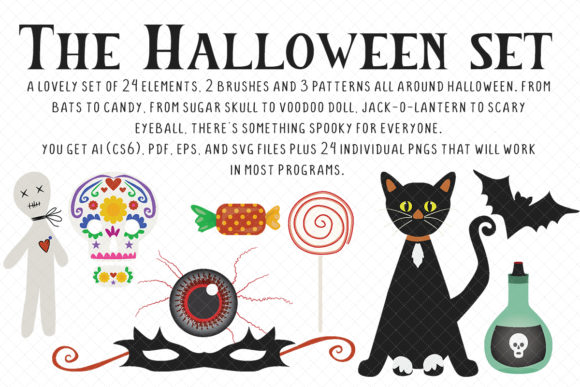
At its core, this set offers a curated mix of 24 distinct elements, two specialized brushes, and three seamless patterns. But listing the contents doesn't tell the whole story. The real value lies in the versatility of the file formats provided. You get AI CS6, EPS, PDF, and SVG files for those who work in vector-based programs, ensuring that your graphics remain crisp whether they are printed on a business card or blown up for a storefront window banner. For everyone else—perhaps those using Canva, Microsoft Word, or basic photo editors—the set includes 24 individual PNG files with transparent backgrounds. This dual approach means that a freelance marketer and a PTA parent can both use the same assets effectively, each within their own comfort zone of software proficiency.
Transforming Small Business Marketing
For small business owners, October is a critical revenue month, but it is also a time when marketing noise reaches a fever pitch. Consider a local coffee shop owner who wants to launch a "Pumpkin Spice Monster" latte. A standard text post on social media might get lost in the scroll. By utilizing the Everything Halloween Set, that owner can quickly assemble a professional-looking flyer. They might take one of the spooky illustration elements, combine it with the included brush strokes to create a dynamic border, and overlay their menu prices using one of the textured patterns as a background.
The ability to access SVG and EPS files is particularly crucial here. If that coffee shop decides to print vinyl decals for their windows or custom cups, vector files ensure the lines stay sharp and clean, avoiding the pixelation that plagues low-resolution JPEGs. This level of quality signals to customers that the business cares about details, which builds trust. Furthermore, the "Spooooooky Fun" vibe of the illustrations strikes a balance; it is eerie enough to be festive but friendly enough not to scare away families with young children. This tonal balance is often hard to achieve when piecing together random images from different sources.
Elevating Event Invitations and Personal Projects
Beyond commerce, there is the personal realm of hosting. Planning a Halloween gathering involves a dozen small tasks, and designing the invitation is often the first hurdle. Instead of buying pre-printed cards that say exactly what everyone else's say, hosts can use these assets to create something unique. Imagine creating a digital invite for a neighborhood block party. You could use the seamless patterns to create a wrapping-paper-style background for an email blast or a printable PDF.
The inclusion of brushes adds a layer of artistic flair that makes digital designs feel hand-crafted. A blogger organizing a virtual costume contest could use these brushes to frame photos of participants, giving the website a cohesive, themed look throughout the month. For educators, the possibilities are equally rich. Teachers often spend their own money on classroom decorations. With the PNG files, they can easily drag and drop ghosts, bats, or pumpkins into lesson plans, worksheets, or reward charts. The "fun and a little spooky" aesthetic fits perfectly in an elementary school setting, adding excitement to learning without crossing the line into genuinely frightening territory.
Navigating File Formats for Maximum Utility
One of the most practical aspects of the Everything Halloween Set is how it accommodates different levels of technical expertise. If you are a graphic designer working in Adobe Illustrator CS6 or newer, the native AI files allow you to ungroup elements, recolor vectors to match a specific brand palette, and manipulate anchor points. This level of control is essential for corporate clients who have strict brand guidelines but still want to participate in seasonal promotions.
However, not everyone has access to expensive creative suites. This is where the PNG files shine. Because they come with transparent backgrounds, they can be dropped into almost any program that handles images. A real estate agent wanting to add a subtle Halloween touch to their monthly newsletter can simply copy a pumpkin element from the set and paste it into their email template. A hobbyist making homemade wrapping paper can tile the provided patterns in a basic design app to create custom gift wrap for friends. The variety of formats removes the barrier to entry, ensuring that the limitation is your creativity, not your software.
Practical Considerations Before You Start
Before diving into a project with this set, it is wise to consider your end goal. Are you designing for print or digital? If you are creating large-format prints like banners or posters, always gravitate toward the vector files (SVG, EPS, AI). These scale infinitely without losing quality. If your output is strictly for screens—social media posts, website headers, or digital invitations—the high-quality PNGs will suffice and are often easier to manage.
Another factor to weigh is licensing and modification. While this set provides robust tools, think about how you want to customize them. The presence of separate layers in the vector files means you can change colors to match your specific theme, perhaps shifting from traditional orange and black to a teal and purple palette for a more modern witchy vibe. Understanding what you can tweak saves time during the design process. Also, consider the cohesion of your project. Since all 24 elements share a consistent artistic style, mixing them together naturally creates a unified brand identity for your event or product, something that is difficult to achieve when sourcing images from multiple disparate libraries.
Ultimately, resources like the Everything Halloween Set are about efficiency and expression. They allow you to skip the tedious search for compatible graphics and jump straight into the fun part of creation. Whether you are wrapping gifts, designing a restaurant menu special, or crafting a spooky newsletter, having a reliable set of high-quality, versatile assets ensures your final output looks professional and intentional. In a season defined by transformation, having the right tools to transform your ideas into reality is the biggest treat of all.