Elevate Art with Doodle Abstract Texture Stamps
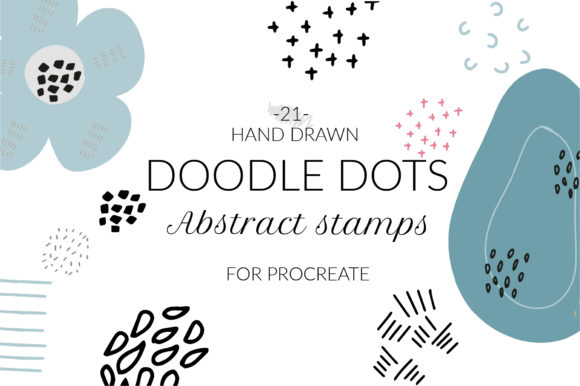
Digital art often risks feeling too sterile. The perfect lines and uniform fills of vector graphics or standard digital brushes can lack the organic warmth found in traditional media. This is where Doodle Abstract Texture Procreate Stamps become an essential tool for modern creators. By integrating hand-drawn imperfections into your workflow, you bridge the gap between digital efficiency and tactile authenticity. These 21 unique brush stamps are designed to add depth, character, and a human touch to any project, transforming flat compositions into layered, engaging visuals.
The collection includes 21 individual .brush files, each meticulously crafted to offer a distinct abstract texture. Unlike generic patterns that repeat mechanically, these hand-drawn elements introduce randomness and flow that mimic real-world materials like rough paper, ink splatters, or charcoal smudges. Whether you are a graphic designer looking to break up solid color blocks, a marketer creating social media assets that stand out, or a hobbyist journaling on an iPad, these stamps provide the raw material needed to elevate your visual storytelling.
Unlocking Creative Possibilities
The true power of Doodle Abstract Texture Procreate Stamps lies in their versatility. They are not just decorative add-ons; they are functional tools that solve common design problems. When a composition feels too rigid or "digital," applying a textured stamp can instantly soften the edges and create visual interest. Consider using these stamps as background layers to give depth to typography, or overlay them on illustrations to unify disparate elements under a cohesive stylistic theme.
For illustrators, these brushes offer a shortcut to complex texturing without the need for time-consuming manual rendering. You can build up layers of abstract doodles to create shadow effects, highlight areas of focus, or simulate the grain of a screen print. The abstract nature of the designs means they do not dictate a specific subject matter, allowing them to blend seamlessly into portraits, landscapes, or geometric abstract pieces. This adaptability makes them invaluable for professionals who need to switch styles quickly between client projects.
Marketers and content creators can leverage these textures to make branded content feel more approachable. In a feed dominated by polished, high-gloss imagery, a post featuring hand-drawn abstract textures signals authenticity and creativity. Use them to frame quotes, background product shots, or create unique story highlights for social platforms. The organic feel helps humanize brands, making them appear more relatable to audiences who crave genuine connection over corporate perfection.
Tailoring Textures to Your Audience
Different projects require different approaches to texture. For educational materials or children's books, the playful, doodle-like quality of these stamps can add a sense of whimsy and fun. Educators creating digital worksheets or interactive lessons can use the stamps to highlight key information without relying on harsh arrows or boxes. The hand-drawn aesthetic invites curiosity and keeps young learners engaged.
In contrast, publishers and authors designing book covers or interior layouts might use these textures to evoke a specific mood. A gritty, heavy stamp can suggest tension in a thriller novel, while lighter, airy doodles might suit a poetry collection or a lifestyle blog. The key is to adjust the opacity and blending modes within Procreate. By lowering the opacity of a stamp layer or switching the blend mode to "Multiply" or "Overlay," you can integrate the texture subtly, ensuring it enhances rather than overwhelms the primary content.
Freelancers and small business owners often need to produce high-quality visuals with limited resources. These 21 stamps act as a mini asset library, providing instant variety. Instead of searching for stock photos that may look generic, you can generate unique backgrounds and accents directly within your design file. This not only speeds up the production process but also ensures that your visual identity remains original and consistent across all platforms, from business cards to website banners.
Practical Installation for All Devices
Getting started with these tools is straightforward, but it requires attention to detail regarding file types and device compatibility. This collection consists of 21 individual .brush files. It is important to note that .brushset files are not included. This distinction is crucial for users with older iPads or those running Procreate version 4.0 or earlier, as these devices do not support the newer .brushset format. By providing individual .brush files, this collection ensures maximum compatibility, allowing everyone to access these creative assets regardless of their hardware age.
To install these brushes, you have two reliable methods depending on your workflow preference. The first method involves using the iPad's Files app:
- Download the folder containing the .brush files to a location on your iPad, such as the "Downloads" folder.
- Open the folder and locate the specific .brush files you wish to install.
- Tap and hold the file with your finger or Apple Pencil to bring up the context menu.
- Select Share from the list of options.
- If you do not immediately see "Open in Procreate," scroll the share sheet and tap on More.
- Find and select Open in Procreate. The app will launch automatically, and the brush will be added to your library.
- Open your project in Procreate and tap the brush icon in the top right corner to find your new tool.
Alternatively, you can import directly from within the Procreate app, which is often faster for batch installations:
- Open Procreate and navigate to the Brush Library.
- Create a new collection by tapping the "+" sign at the top left, or select an existing collection where you want to store these tools.
- Tap on the collection name, then select Import.
- Navigate to the folder where you downloaded the brushes, select the .brush files, and they will be instantly added to your chosen collection.
For better organization, especially when managing multiple assets, it is highly recommended to rename the imported brushes. You can do this by swiping left on the brush in the library and selecting "Rename." Giving them a clear name, such as "Doodle Texture 01" or "Abstract Stamp Collection," helps you locate them quickly during intense creative sessions.
Maintaining Clarity and Consistency
While textures add richness, overusing them can lead to visual clutter. To keep your results clear and effective, treat these stamps as seasoning rather than the main course. Start with a low opacity and build up gradually. Pay attention to the hierarchy of your design; ensure that the texture supports the focal point rather than competing with it. Consistency is key when working on multi-page documents or brand campaigns. Stick to a limited selection of 2 or 3 stamps from the 21 available to create a recognizable visual language.
Experimentation is encouraged, but always review your work on the actual device or platform where it will be viewed. What looks detailed on a large iPad screen might appear muddy on a mobile phone display. Adjust the scale and intensity of the Doodle Abstract Texture Procreate Stamps accordingly. By balancing inspiration with practical discipline, you can harness the full potential of these hand-drawn files to create work that is both visually striking and professionally polished.
This is a digital type instant download. No physical print, mockup, or photo is included. The value lies entirely in the digital files and the creative freedom they unlock within your Procreate environment. Embrace the imperfection, layer with intention, and let these abstract elements bring a new dimension to your digital artistry.